On-page · HD · Room-aware
Every Airbnb listing photo—collected, sorted, ready to ship
Hosts waste time right-clicking each shot. Designers lose room context. Analysts need captions in rows. Airbnb Image Downloader works from the live listing page so you can move from gallery to ZIP or CSV without a side-channel scraper.
Built for property marketing, creative references, and structured research—without pretending a twenty-tab save marathon is “good enough.”
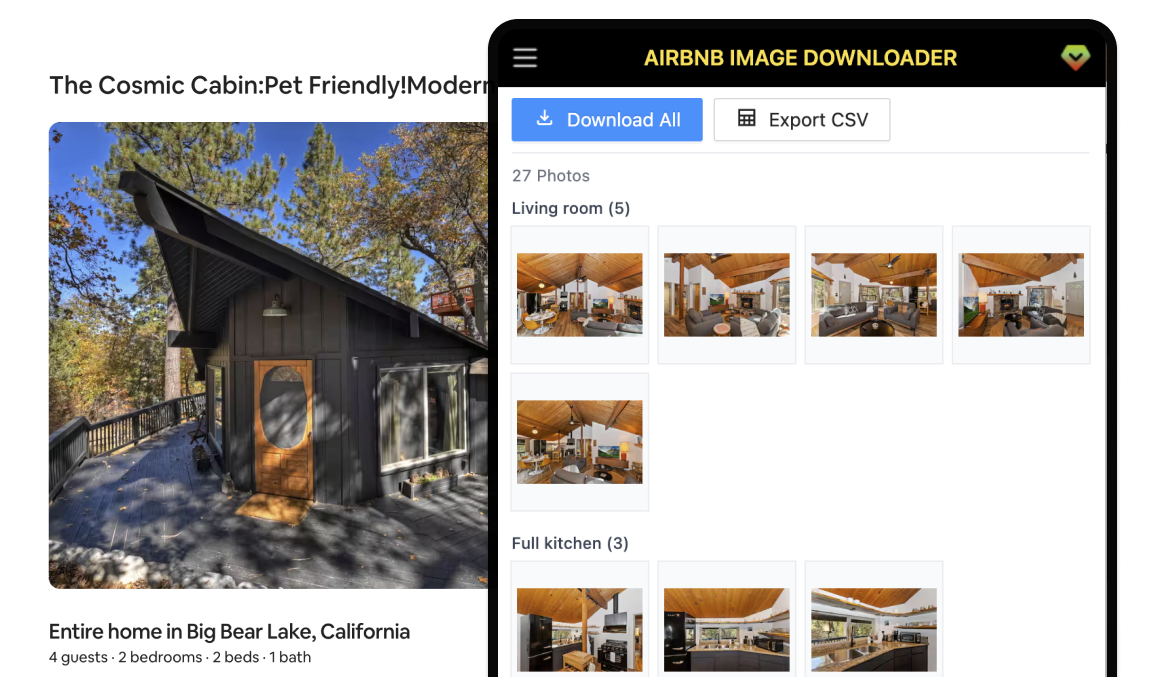
Built around how Airbnb listings actually look
Heavy galleries, room labels, and HD sources are the norm—your export flow should match that reality.
Dozens of photos, one calm workflow
Airbnb listings pile on images fast. Instead of right-click chaos, open the sidebar on the listing you are already viewing and work from a single gallery view.
ZIP folders that match how the listing is organized
Hosts and PMs reuse shots across sites and channels. Export bundles photos into subfolders by room so filenames and structure stay aligned with the listing.
Higher-resolution files for real reuse
Designers and marketers need pixels, not mushy previews. The extension targets high-resolution sources so your mood boards, OTA refreshes, and print crops start from the right asset.
CSV metadata when spreadsheets beat a folder
Researchers and analysts need captions, room tags, and URLs in columns—not only pixels. Export a CSV with stable fields for labeling, QA, or downstream tools.
Runs beside the page you are on
No separate crawler or mystery server job. The panel lives next to the Airbnb listing, so you see the same thumbnails and counts before you export.
Local-first by design
Listing media is handled in your browser session. This site does not batch-download images for you; the extension does, under your control and account.
CSV export columns
When you need a machine-readable index alongside images, the CSV includes these fields for each photo.
- id
- room
- caption
- localized_caption
- orientation
- aspect_ratio
- url
Availability of each field follows what Airbnb exposes on the listing. Pricing describes plan limits.
How it works
From install to an organized bundle in three steps.
Install the extension
Add Airbnb Image Downloader from the Chrome Web Store or follow the guided install.
Open any Airbnb listing
Browse to a property on airbnb.com as you normally would and wait for photos to load.
Export from the sidebar
Use the extension panel on the listing page to download organized media or metadata.
Simple pricing for bulk image exports
Start free on every listing page. Upgrade to Pro for monthly subscription pricing—bulk ZIP downloads and CSV metadata exports included. Cancel anytime.
Free
Install the extension and explore the panel on real Airbnb listings before you subscribe.
- Install and open the sidebar on Airbnb listing pages
- Preview detected photos and room groupings
- Extension updates while on the free tier
- Bulk “download all” ZIP export is not included
- CSV export is not included
Pro
For hosts, designers, and analysts who need every photo in HD, grouped by room, plus a structured CSV index.
- Bulk ZIP download of all listing photos
- Automatic subfolders by room label
- CSV export with id, room, captions, orientation, aspect ratio, and URL
- High-resolution sources where Airbnb exposes them
- Priority support from the ExtensionsFox team
- Updates included while subscribed
Ship your next listing refresh without the save-a-thon
Add Airbnb Image Downloader and keep gallery work on the page where decisions already happen.
Frequently asked questions
Which Airbnb pages are supported?
Use the extension on Airbnb listing detail pages where the photo gallery is available. Coverage follows what Airbnb exposes in the page; some fields may be empty when Airbnb does not provide them.
Where do I see what each plan includes?
See the Pricing section on this page for a clear comparison of Free and Pro capabilities.
Is Airbnb Image Downloader affiliated with Airbnb?
No. Airbnb Image Downloader is published by ExtensionsFox and is not endorsed by or affiliated with Airbnb. Trademarks belong to their respective owners.
What should I know about terms of use?
You are responsible for complying with Airbnb’s terms of service, applicable laws, and any agreements that govern your access to listing content. Use the extension only for scenarios you are authorized to copy or export.
Do you store the photos I export?
This marketing site does not run exports for you. The extension operates in your browser. Refer to the Chrome Web Store listing and our Privacy Policy for how ExtensionsFox handles support or account-related data.
Who can I contact for help?
Email help@extensionsfox.com with questions about billing, installation, or troubleshooting.